
Free NetSuite add-on
Know before you close.
Close Readiness is a free NetSuite add-on. In a few seconds it shows a finance team what will stop this month's close.
Read-only · runs inside NetSuite · free, no time limit
Get it for your NetSuite account.
We share the bundle to your account and email you the install steps.
Read-only. It changes nothing.
Close Readiness only reads. It runs queries under your own NetSuite role and never creates, edits or deletes a record.
Runs inside NetSuite. No data leaves the account.
It is a SuiteLet in your own account. It calls no outside service, sends nothing to Clarative and loads no outside fonts or scripts.
Free, with no time limit.
No trial period, no licence fee and no card details. Keep it for as long as it is useful.
What it checks
Eleven checks, as at the period end.
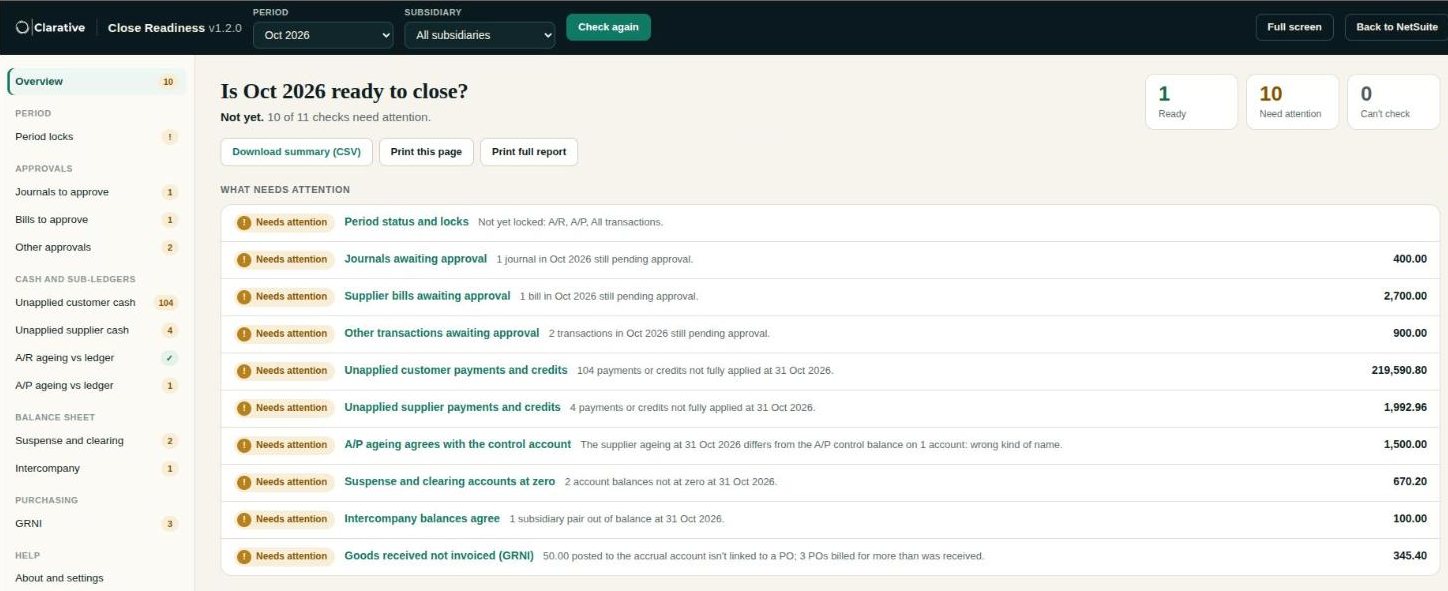
Pick a period. Each check answers Ready, Needs attention or Can't check, with the reason. Every finding drills down to the NetSuite records behind it and downloads as CSV.
Period1 check
Period status and locks
Ready when: The period is closed, or the A/R, A/P and all-transaction locks are set.
Approvals3 checks
Journals awaiting approval
Ready when: No journal in the period is pending approval.
Supplier bills awaiting approval
Ready when: No bill in the period is pending approval.
Other transactions awaiting approval
Ready when: No expense report, customer payment, cash sale or other posting transaction is pending approval.
Cash and sub-ledgers4 checks
Unapplied customer payments and credits
Ready when: Nothing dated by the period end was still unapplied at the period end.
Unapplied supplier payments and credits
Ready when: The same for bill payments and bill credits.
A/R ageing vs control account
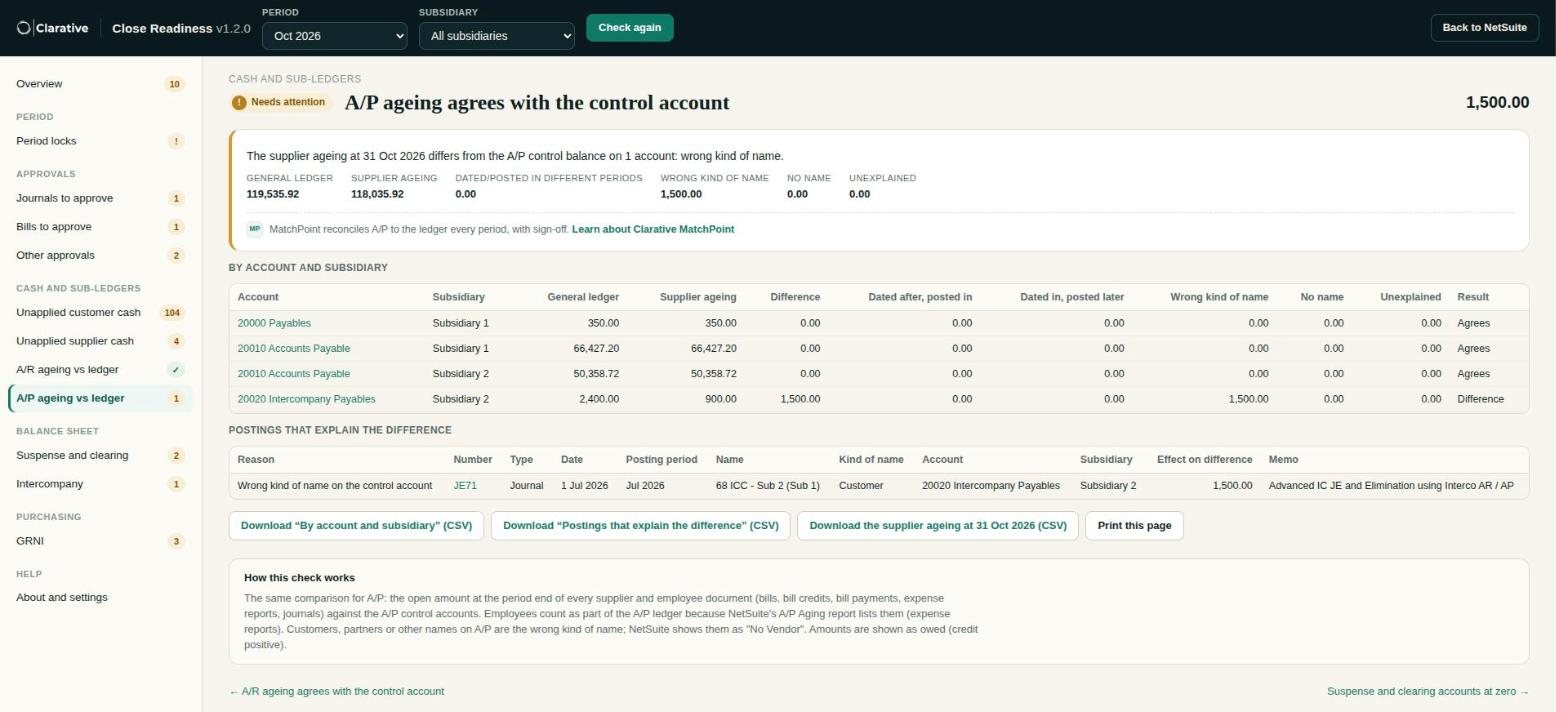
Ready when: The customer ageing equals the A/R control accounts, and any difference is explained posting by posting.
A/P ageing vs control account
Ready when: The supplier and employee ageing equals the A/P control accounts, with the reason for any difference.
Balance sheet2 checks
Suspense and clearing accounts at zero
Ready when: Each suspense and clearing account is within materiality, per subsidiary.
Intercompany balances agree (OneWorld)
Ready when: Each subsidiary pair's balances are equal and opposite.
Purchasing1 check
Goods received not invoiced (GRNI)
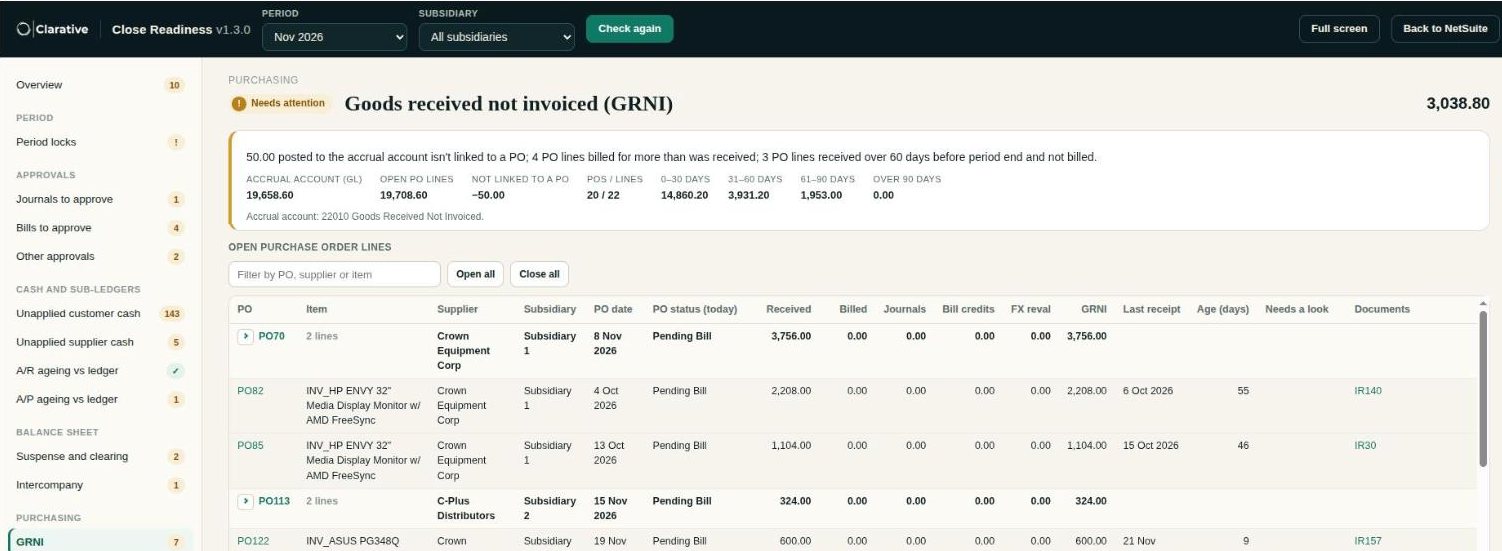
Ready when: GRNI by PO and item ties to the accrual account, no line is billed beyond receipt and nothing is older than the age limit.
New
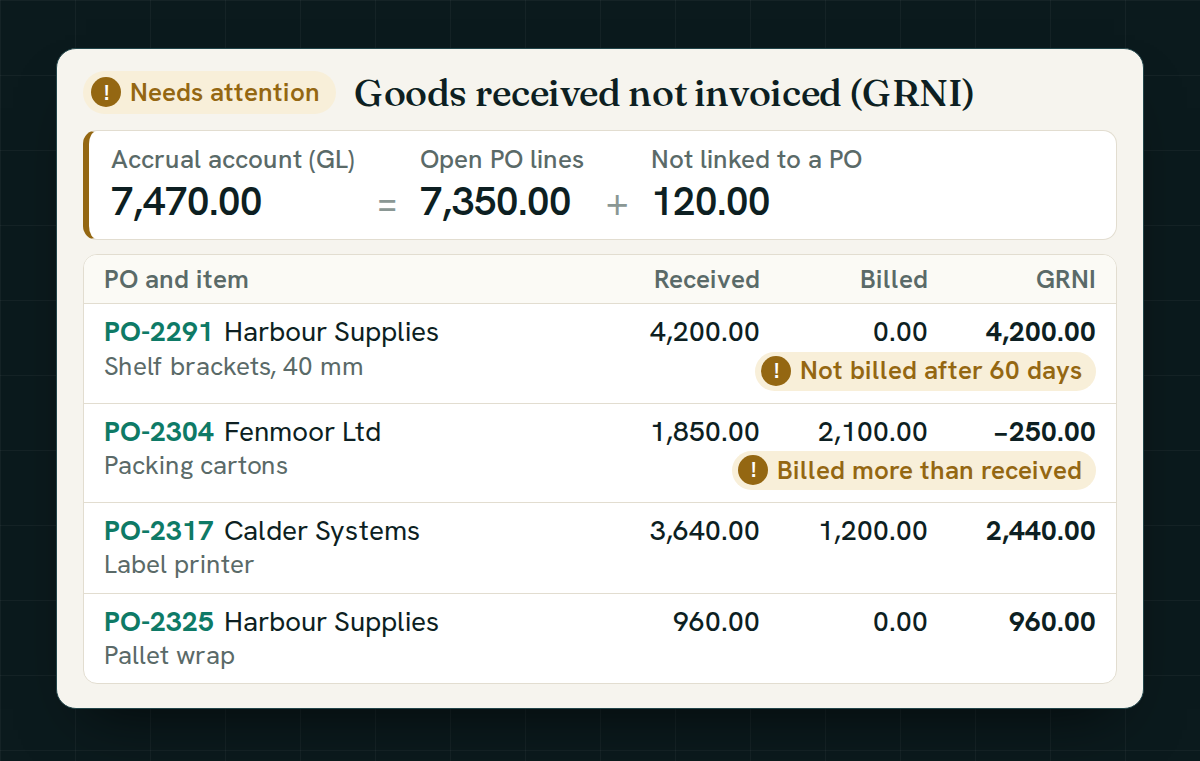
GRNI, reconciled to the ledger.
- Goods received not invoiced, by purchase order and item.
- Ties to the accrual account, with anything not linked to a purchase order shown as the difference.
- Flags lines not billed after a set number of days, and lines billed for more than was received.
Inside NetSuite
The reason, not just a red light.
Each check has its own page: the totals, the accounts or purchase orders behind them, and the postings that explain any difference. Screens shown use NetSuite demonstration data.
How it works
From request to first run.
Request it
Fill in the form at the top of this page. If you have it, include your NetSuite account ID.
We share the bundle
We share Close Readiness to your NetSuite account and email you the bundle ID and install steps.
Install in a few minutes
An administrator installs it from SuiteBundler: search by the bundle ID, then Install.
Run it
Pick a period and see what will stop the close. Run it again as often as you like.
From Clarative
Close Readiness finds it. MatchPoint fixes it every month.
Clarative MatchPoint does the work the checks point to: reconciliation and sign-off for every balance sheet account, bank reconciliation, cash application and credit control, and intercompany. Where MatchPoint covers a check, Close Readiness says so in one line.
Questions
Before you ask for it.
Is it really free?
Yes. There is no licence fee, no trial period and no time limit. We make it free because finance teams who use it sometimes want the next step, Clarative MatchPoint, which does the reconciliation and sign-off work the checks point to. You don't have to buy anything to keep using Close Readiness.
Does it change anything in NetSuite?
No. It only runs read-only queries and draws a page. It creates no records, so uninstalling it from SuiteBundler leaves nothing behind.
What permissions does it need?
An administrator installs the bundle, and the account needs the Server SuiteScript feature turned on (most accounts have it). To run it, a role needs view access to accounting periods, accounts and transactions. Each person sees only what their own role already shows them. If a role can't see enough to answer a check, that check says “Can't check” with the reason, never a false “Ready”.
Does it work with OneWorld and non-OneWorld accounts?
It is built for both. In OneWorld it adds a subsidiary filter, shows every check by subsidiary and keeps amounts in each subsidiary's currency. The intercompany check only applies to OneWorld accounts.
Who sees my data?
Nobody outside your company. Close Readiness runs inside your NetSuite account and sends nothing to Clarative or anyone else. The only data we receive is what you type into the request form.
Get it for your NetSuite account.
Read-only, runs inside your account, and free with no time limit. The request form takes about a minute.
Questions first? Email support@fowlersconsulting.co.uk or book a MatchPoint demo.